
Evidence-led comparison
UserTesting vs Userlytics: Tests, Recordings and Payment Timing Compared
A symmetrical official-source comparison of eligibility, screeners, recording, privacy and PayPal timing.
Updated November 7, 2026 · IT9X Editorial
SEO title: UserTesting vs Userlytics: Tester Comparison | IT9X
Meta description: Compare UserTesting and Userlytics by eligibility, screening, test format, privacy requirements and payment evidence—not earnings claims.
Canonical: https://it9x.net/compare/usertesting-vs-userlytics
Verified: 2026-11-06

UserTesting and Userlytics both recruit people to evaluate digital experiences, but neither offers predictable work. The useful comparison is not a headline “pay rate.” It is whether your country, PayPal access, device, privacy preferences and communication style fit each platform's current workflow.
Quick comparison
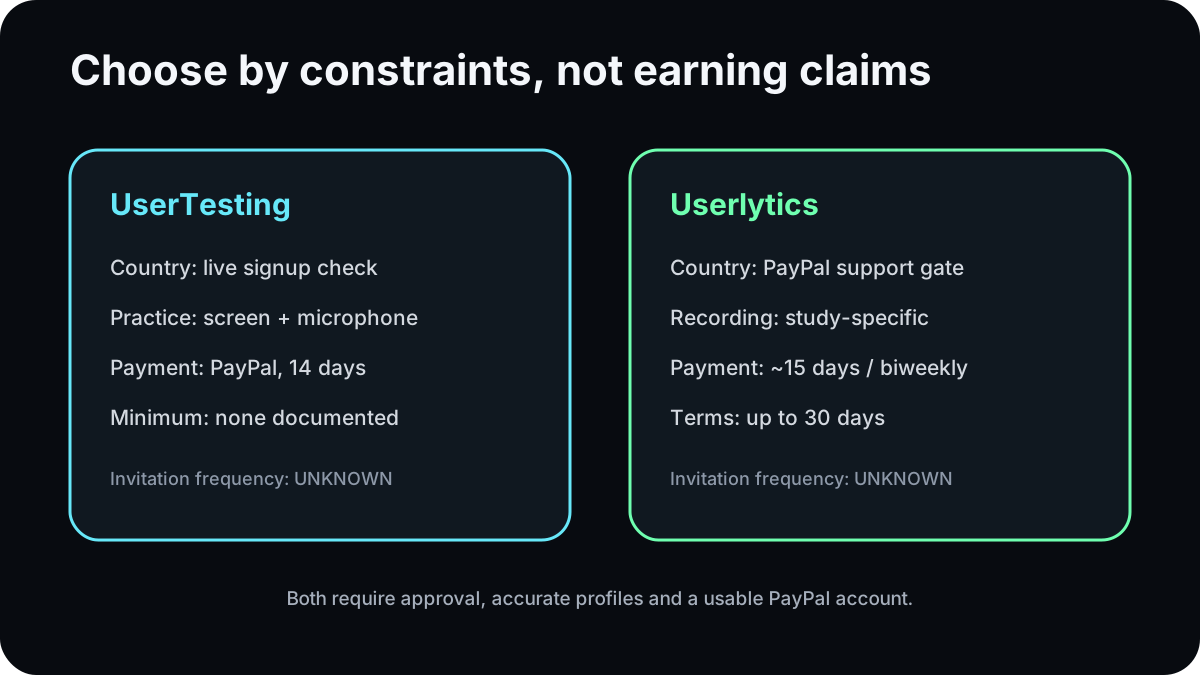
| Constraint | UserTesting | Userlytics |
|---|---|---|
| Country evidence | Accepts changing locations based on supply and demand; signup is the live eligibility check | Country help says participation generally depends on PayPal support |
| Application | Profile plus practice test, normally 15–20 minutes total | Email/profile and a short practice test |
| Test access | Profile match and screeners; no guaranteed volume | Limited random invitations from matching tester database |
| Typical formats | Recorded tests and live conversations across supported devices | Recorded, browser/mobile and moderated studies |
| Recording | Practice test requires screen and microphone; studies disclose their format | Screen/audio common; some studies require webcam |
| Current payment rail | Verified PayPal | PayPal only in current help documentation |
| Normal timing | Automatic payment 14 days after completion, once approved | Biweekly Friday processing, roughly 15 days after completion when approved |
| Minimum payout | No minimum in current payment FAQ | No balance threshold described; tests are paid automatically after approval |
| Invitation frequency | UNKNOWN | UNKNOWN |
Eligibility and location
UserTesting does not publish a permanent country list. Its current participant help says the eligible-location list changes with supply and demand and instructs a prospective participant to use signup as the definitive check. Userlytics' country page takes a payment-based approach: if PayPal works in the country, participation should generally be possible.
Neither statement means equal availability. A supported signup can still yield few opportunities when client demand does not match a profile.
Application and qualification
UserTesting says its application, including the practice test, takes about 15–20 minutes. A compatible device and microphone plus an active PayPal account are required. The practice recording takes about 7–10 minutes and needs screen and microphone access. Review normally takes a few days.
Userlytics asks prospective testers to sign up and take a short practice test. Its official materials say matching studies trigger invitations. Some studies also use screeners, and dishonesty can damage a tester's rating or future eligibility.
Both systems therefore have unpaid qualification steps. Passing them creates eligibility, not a right to assignments.
Test formats and recording
Both platforms can ask participants to speak thoughts aloud while navigating an app, site or prototype. UserTesting also offers live conversations and recorded tasks. Userlytics supports moderated and unmoderated sessions, mobile tests and studies that may use webcam footage.
The practical privacy question is study-specific: what will be captured, for how long, and who can see it? UserTesting's privacy material says customers may collect information through tests or screeners and can act as data controllers for that information. Userlytics says portions of screen, audio, webcam or written feedback may be used as samples for potential clients or marketing; its FAQ tells people who object not to register.
Before either platform, close notifications, remove private files from the recorded screen, and never enter real financial credentials merely to simulate a checkout.
Screeners and unpaid time
A screener matches a researcher's target audience. It can reject an honest participant even when their account is in good standing. Do not alter demographics to pass. UserTesting and Userlytics both rely on profile matching and study-specific selection, so the time spent checking invitations and answering screeners is part of the participation cost.
This is why an advertised incentive is not an hourly-income forecast. You must consider unmatched invitations, unavailable slots, screening and review.
Payment comparison
UserTesting's current payment FAQ says approved tests go automatically to verified PayPal 14 days after completion, in USD, with no payout minimum. Userlytics' dedicated help article says payments for approved work are processed to PayPal every two weeks, on the first Friday after the 15-day window. Userlytics' tester terms retain a maximum of 30 days.
These timelines are close in the normal case. They differ more in wording and exception handling than in headline speed. PayPal availability, account verification, approval and correct profile details matter on both services.
Which may fit you better?
Consider UserTesting first if: the live signup accepts your location, you want a clearly documented 14-day automatic schedule, and you are comfortable with its practice recording and client screeners.
Consider Userlytics first if: PayPal operates in your country, you are comfortable with possible webcam use, and its invitation/recorder model suits your devices.
Consider both if: both accept you and you can manage notifications without treating either as guaranteed income. There is no official evidence that one universally provides more invitations.
Choose neither if: you require predictable work, cannot receive PayPal, or cannot safely create the recording environment requested by a study.
Pros and cons at a glance
UserTesting has unusually clear current payment documentation and a signup-based country check, but its changing geographic gate makes static “available worldwide” lists unreliable. Userlytics documents broad PayPal-based access and several formats, but random invitation selection and its recording/marketing-use disclosure deserve careful review.
Common comparison mistakes
- Ranking the platforms using unverified user earnings.
- Treating a study incentive as an hourly wage.
- Assuming account acceptance guarantees invitations.
- Ignoring screeners, practice time and available-slot competition.
- Calling either service worldwide without a current country check.
- Hiding the recording and data-use differences.
Explore the UserTesting profile, Userlytics profile, UserTesting contributor guide, user-testing category, and personal-data safety guide. The new detailed Userlytics guide should be linked only after it is published.
FAQ
Which platform pays faster?
Their documented normal schedules are similar: UserTesting says 14 days; Userlytics says roughly 15 days with biweekly Friday processing. Approval and exceptions matter.
Can I join both?
The reviewed rules do not establish a cross-platform prohibition. You must still follow each service's one-account, confidentiality and quality rules.
Which offers more tests?
Unknown. Neither official source guarantees frequency, and individual demand varies.
Do both use PayPal?
Yes, in the current participant documentation. Users must verify that PayPal can receive funds in their country.
Is a webcam always required?
No. Requirements vary by study, although screen and microphone recording are common and some sessions require a webcam.
Official sources
Sources used
- www.usertesting.comwww.usertesting.com · checked 2026-11-06
- participant-support.usertesting.comparticipant-support.usertesting.com · checked 2026-11-06
- participant-support.usertesting.comparticipant-support.usertesting.com · checked 2026-11-06
- www.usertesting.comwww.usertesting.com · checked 2026-11-06
- www.userlytics.comwww.userlytics.com · checked 2026-11-06
- www.userlytics.comwww.userlytics.com · checked 2026-11-06
- www.userlytics.comwww.userlytics.com · checked 2026-11-06
- www.userlytics.comwww.userlytics.com · checked 2026-11-06
This comparison does not rank platforms by unsupported earnings claims. Check current terms before joining.