
EDUCATION
Userlytics Tester Guide: Invitations, Recordings and Payment Timing
An official-source guide to Userlytics invitations, screen and voice recording, tester approval and conditional PayPal timing.
Updated November 7, 2026 · IT9X Editorial
SEO title: Userlytics Tester Guide: Tests, Privacy & Payment | IT9X
Meta description: See how Userlytics tester invitations, recordings and payments work, what remains variable, and what to check before taking a usability test.
Canonical: https://it9x.net/guides/userlytics-tester-guide
Verified: 2026-11-06

Userlytics connects people with usability studies involving websites, apps, prototypes, advertisements and other digital experiences. It can be a legitimate way to receive occasional research incentives, but registration is not a promise of tests or income. Invitations depend on a participant's profile and a client's research needs, and a completed test must meet the study requirements before payment.
Quick answer
Userlytics says testers must be at least 16, complete a short practice test, and have a compatible device, microphone and a valid PayPal account. Some studies use a webcam or a dedicated recorder; others run in a browser or on mobile. Invitations are limited and randomly matched from the tester database. Approved tests are currently processed to PayPal on a fortnightly Friday schedule, roughly 15 days after completion. The tester terms retain a broader outside limit of 30 days, so treat the help-center schedule as the normal process rather than a guarantee for every case.
What Userlytics testers do
The work is research, not quality assurance in the software-engineering sense. A study may ask you to navigate a website, use a prototype, react to an advertisement, compare two designs, or explain whether a process is understandable. The useful output is your honest, spoken or written reasoning.
Userlytics supports moderated and unmoderated studies. A project can run on desktop, smartphone or tablet. The official tester FAQ says some tests require screen, audio and webcam recording; the exact equipment and permissions should be visible before or when a study begins.
Eligibility and country availability
The public tester signup states an age of 16 or older. The tester terms add that a person must be able to form a binding contract where they live, or have parental approval. Those statements are not interchangeable with a universal minimum age: local law can impose a higher threshold.
Userlytics' current country help page says people in countries where PayPal is supported should generally be able to participate because PayPal is its only listed tester payment method. That is evidence of broad reach, not proof that every country receives equal study demand. Payment-account availability, sanctions, client targeting, language and demographic demand can all limit practical access.
From signup to payment
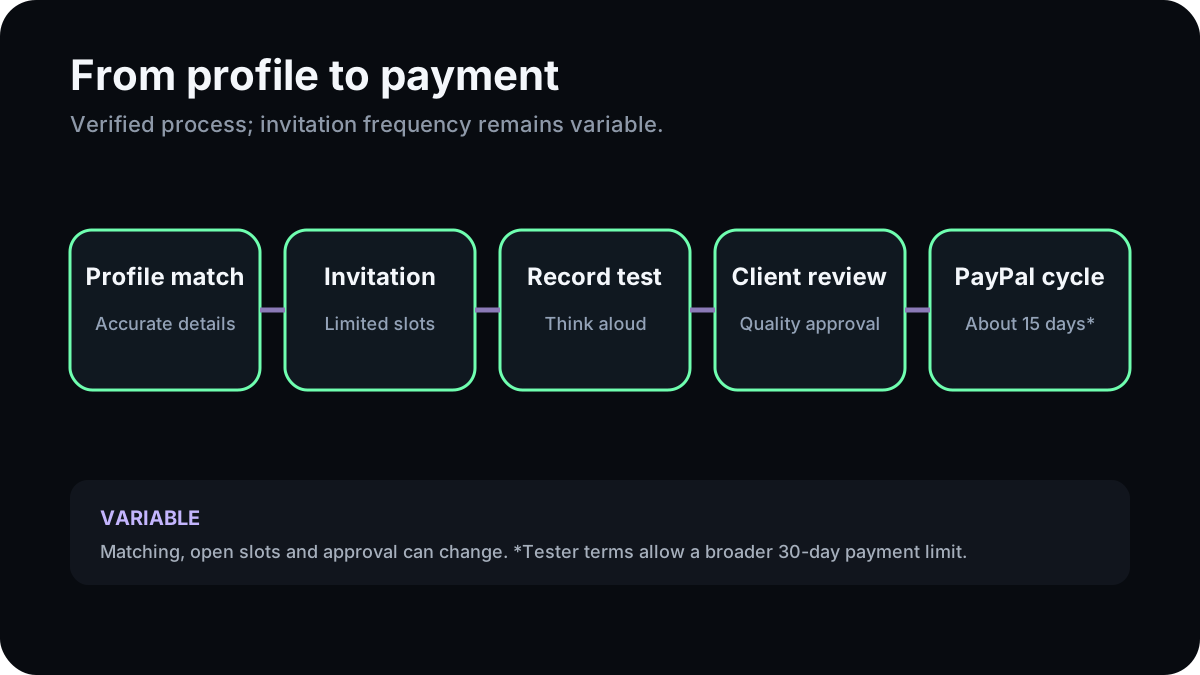
| Stage | What is verified | What remains variable |
|---|---|---|
| Signup | Email, profile and agreement to tester terms; signup page says 16+ | Local contractual-age rules |
| Qualification | A short practice test may be required | Acceptance and review time |
| Invitation | A matching study triggers an email or dashboard invitation | Frequency and available slots |
| Screener | Honest answers determine fit for some studies | Passing a screener is never guaranteed |
| Session | Follow tasks and speak thoughts aloud; recording depends on study | Device, camera and moderation format |
| Review | Client positively rates/approves usable feedback | Rejection if instructions or quality rules are not met |
| Payment | PayPal; normal help-center schedule is about 15 days, processed biweekly | Terms allow up to 30 days and exceptional delays |
Device and recording preflight
Before accepting a test:
1. Read the invitation for required device and estimated duration.
2. Test the built-in microphone and, if requested, the webcam.
3. Close personal messages, password managers and unrelated tabs.
4. Move private files and notifications off the screen being recorded.
5. Do not use real financial credentials just to complete a fictional task.
6. Confirm that the PayPal email in your tester profile is correct.
The official FAQ explicitly advises stopping and contacting support if a task asks for sensitive financial details such as a real credit-card number, Social Security number, password or home address. A legitimate research task can request consent and relevant demographic information, but you should still understand what will be recorded and who will receive it.
Invitations, screeners and common mistakes
Userlytics says invitation selection is random among matching testers and that only a limited number are invited. Completing a detailed profile can improve matching, but it cannot create demand. Responding late can also mean a slot is already taken.
Common mistakes include inventing screener answers, rushing instructions, going silent during a think-aloud task, allowing background noise, blocking a required webcam, creating duplicate accounts, or submitting an incomplete test. The tester terms say these issues can lead to rejected work and non-payment.
Payment facts and limitations
The dedicated payment article says an approved test is paid automatically to PayPal on Fridays every two weeks, approximately 15 days after completion. It also explains that approval matters. The September 2026 tester terms say payment may take up to 30 days and may use another platform if Userlytics specifies one, but the current country article identifies PayPal as the only available method.
These are source differences, not a reason to promise the faster date. Plan around the longer contractual window and contact official support when an approved payment is overdue.
Pros and cons
Potential advantages
- Several research formats across desktop and mobile.
- The requirement is candid feedback, not specialist UX training.
- Study-specific invitations can show the expected task before participation.
- Official documentation explains recording and payment conditions.
Important limitations
- No guaranteed invitation frequency.
- PayPal availability is a practical country gate.
- Screen, voice and sometimes face recording create privacy tradeoffs.
- Client approval and submission quality affect payment.
- Tax examples in the FAQ are US-specific and should not be generalized.
Who may find it suitable?
Userlytics may suit someone who can speak clearly while working through a digital task, is comfortable checking recording permissions, and treats invitations as occasional opportunities. It is a poor fit for someone who needs predictable work, cannot receive PayPal payments, or is uncomfortable with the recording required by a particular study.
For broader context, see the Userlytics platform profile, user-testing category, privacy guide, and IT9X's explanation of screeners and unpaid qualification time.
FAQ
Is joining Userlytics free?
The official tester signup does not describe a joining fee. Never pay a third party for an invitation or account.
How often will I receive tests?
Unknown. Userlytics says invitations are random, limited and dependent on profile matches.
Does every test record my face?
No. Some require a webcam and some do not. Check the exact study requirements before starting.
When does Userlytics pay?
The current help article describes automatic PayPal processing every two weeks, about 15 days after completion, once approved. The tester terms permit up to 30 days.
Can I use fake details in a screener to qualify?
No. The official rules require accurate information, and dishonest answers can affect ratings, payment or account access.
Official sources
Official and primary sources
- www.userlytics.comwww.userlytics.com · checked 2026-11-06
- www.userlytics.comwww.userlytics.com · checked 2026-11-06
- www.userlytics.comwww.userlytics.com · checked 2026-11-06
- www.userlytics.comwww.userlytics.com · checked 2026-11-06
Information only. Requirements and payment terms can change; confirm the current details with the official platform.
Browse all guides